
Very Rough Layouts
Rough layouts are approximations of what the layout could look like, without actually settling on a fixed layout.
The take into consideration all input available at the time and lay them closely to each other
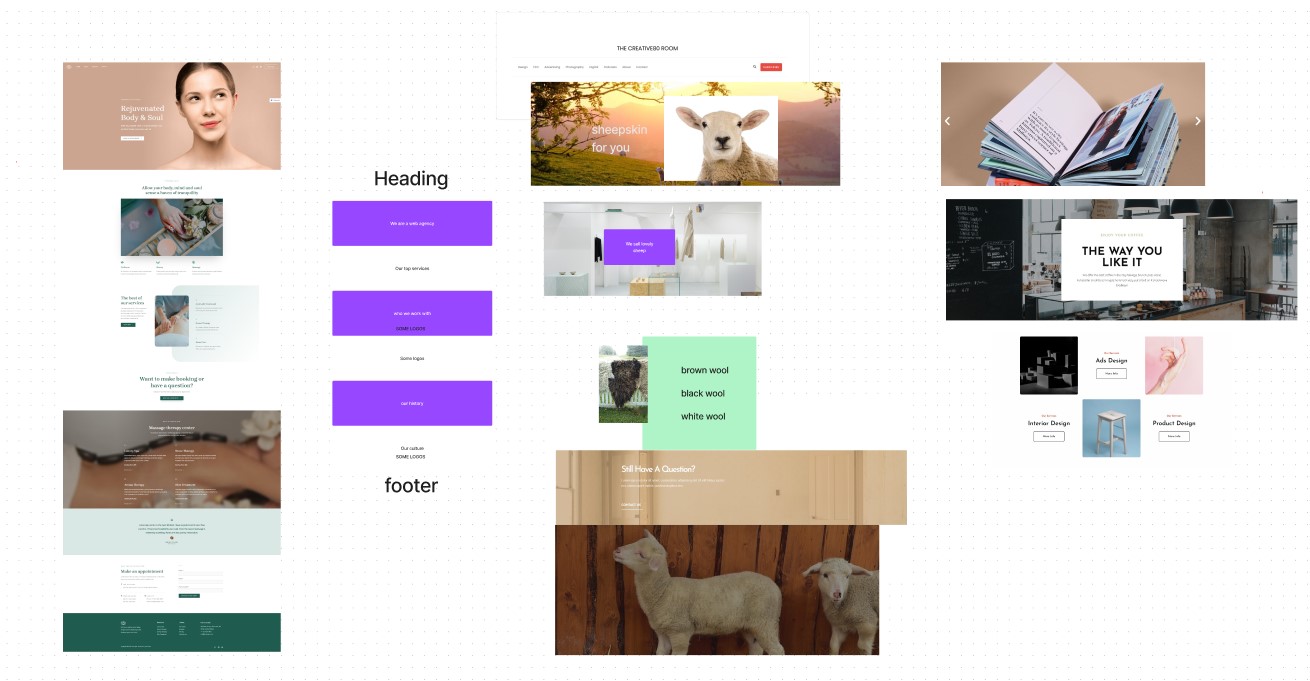
Rough Layouts are made in FigJam
There is a template, a content structure, a very rough layout and some section layouts.
At this stage, we’re testing rough ideas to see what sticks.
How to make Very Rough Layouts
Rough layouts are made in FigJam. You are bring ideas together, not actually defining a layout.
Keep your ideas and influences close by
You should keep the influences and options you considered close to the layout of each page. For example, alternative photo or layout choices.
Don't progress to "quite rough layouts" if...
If the design is very simple and stays very close to the template.
The developer should be able to understand the outcome required. They can always adjust things in the polishing phase.
Have enough input before creating rough page layouts
Layouts should not be created using random design ideas. You need plenty of ideas such as content structure, photos, layout ideas.
Using layouts with templates and sections
To keep a consistent, look, you should be sticking close to the template and only using minimal amount of section layouts.
Leave things to the imagination
Communicate layout ideas, not concrete plans.
If your layouts are accurate, then people have a hard imaging different solutions.
Creating rough changeable layout ideas
Don't be afraid to show rough work to the client
Layouts should not be created using random design ideas. You need plenty of ideas such as content structure, photos, layout ideas.